Berryful Creations LLC
Custom Google Leave Us a Review Sticker with QR Code
Custom Google Leave Us a Review Sticker with QR Code
Couldn't load pickup availability
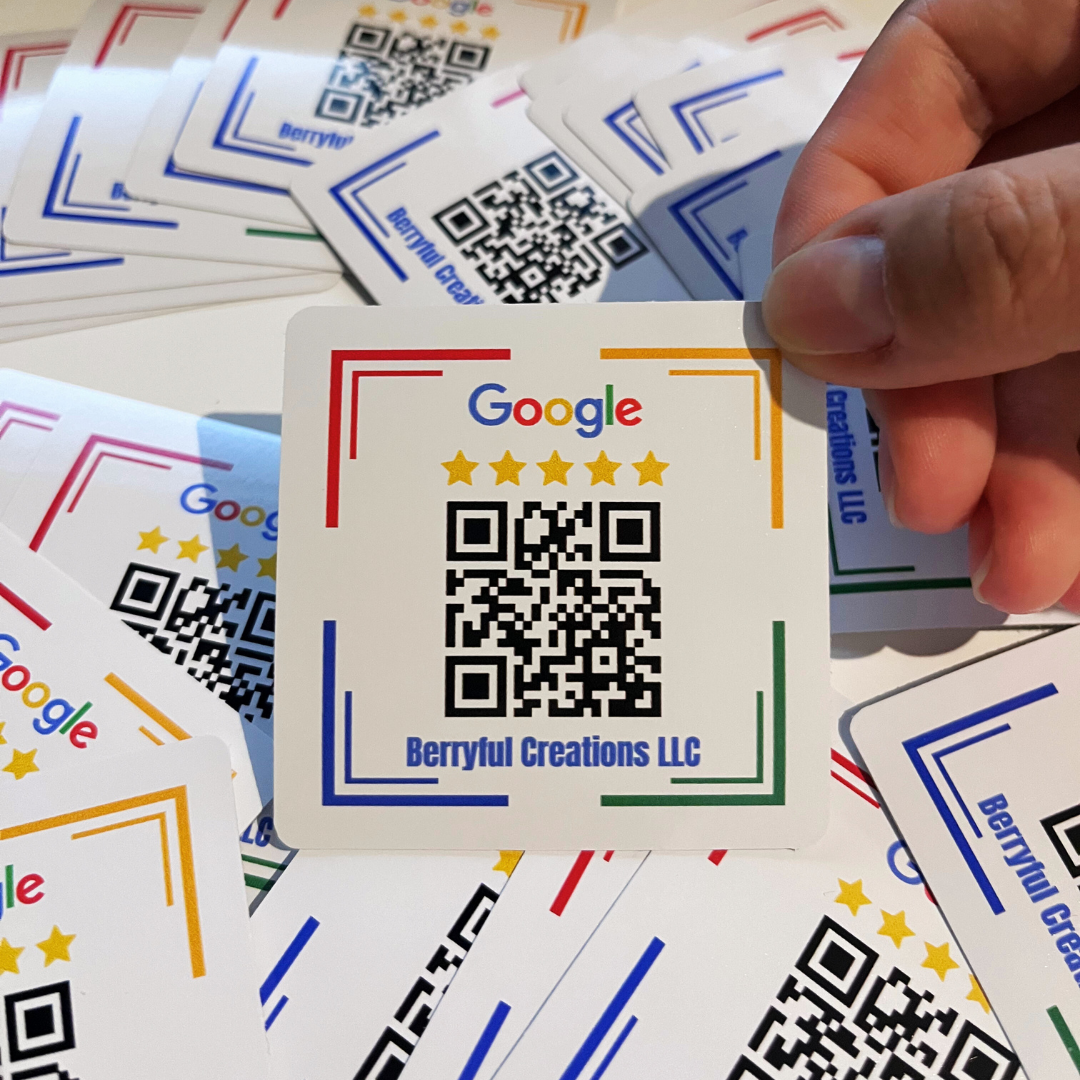
⭐ Custom Google Review QR Code Stickers – Matte Vinyl Die-Cut Sticker Sheets
Make it easier for happy customers to leave your business a Google review. Our Custom Google Review QR Code Stickers are printed on matte vinyl and personalized with your business logo and a QR code linked directly to your Google review page.
Each order comes as sticker sheets with individually die-cut, peel-and-stick stickers, making them easy to add to product packaging, shopping bags, takeout orders, thank-you cards, folders, boxes, receipts, and other customer touchpoints.
Customers simply scan the QR code with their phone and go directly to your Google review page, eliminating the need to search for your business manually.
⭐ YOUR BUSINESS, YOUR BRAND
These stickers are customized for your business.
- Your Business Logo
- Your Google Review QR Code
- Your Selected Design Style
- Your Business Branding
- No Berryful Creations logo on the finished stickers
Only your business logo appears on the customized design.
📏 Product Details
- Product: Custom Google Review QR Code Sticker
- Material: Matte Vinyl
- Format: Multiple stickers supplied on a sheet
- Cut: Individually die-cut for easy peeling
- Finish: Smooth matte finish
- Printing: Full-color printing
- Customization: Your business logo + Google Review QR code
- Application: Peel-and-stick
- Design: Choose from available design styles
- Custom Sizes: Available upon request
- Bulk Quantities: Available
📱 How the Google Review QR Code Works
Each sticker includes a QR code linked to your business's Google review page.
Your customer simply:
- Opens their phone camera
- Scans the QR code
- Opens your Google review page
- Leaves their rating and review
This makes requesting reviews much easier than asking customers to search for your business on Google themselves.
🎨 Customization Options
Personalize your stickers with:
- Business Logo
- Google Review QR Code
- Business Colors
- Selected Sticker Style
- Custom Size
- Custom Shape
- Additional Messaging Upon Request
Have something different in mind? We can also help with a completely custom sticker design.
💡 Why Choose Google Review QR Code Stickers?
These stickers are a good choice for businesses that already have a physical customer touchpoint, such as packaging, shopping bags, takeout containers, thank-you cards, folders, or completed orders.
Instead of sending a separate follow-up message asking for a review, the reminder travels directly with the customer's purchase or paperwork.
The QR code also removes an extra step. Rather than asking a customer to search for your business, find the correct Google listing, and locate the review option, you can direct them straight to your review page.
Because the stickers are customized with your own business logo, they also feel like part of your existing packaging and branding rather than a generic review request.
🎯 Best For
- 🛍️ Retail Stores
- 📦 Ecommerce & Online Orders
- 🍽️ Restaurants & Takeout Orders
- ☕ Coffee Shops & Cafés
- 🧁 Bakeries & Catering Companies
- 💇 Salons, Spas & Beauty Businesses
- 🏠 Realtors & Property Professionals
- 🔧 Contractors & Home Service Businesses
- 🦷 Dental & Healthcare Offices
- 🚗 Automotive Businesses
- 🎁 Small Business Packaging
- 📁 Service Completion Folders
- 💌 Thank-You Cards
- 🛒 Local Businesses
📦 Where Can You Use Google Review Stickers?
Add them to customer touchpoints such as:
- Shipping Boxes
- Product Packaging
- Shopping Bags
- Takeout Containers
- Thank-You Cards
- Receipts
- Customer Folders
- Service Completion Packets
- Gift Bags
- Mailers
- Pickup Orders
- Delivery Orders
For best results, place the sticker somewhere customers naturally see it after they've received your product or service.
🎨 How to Order
1. Choose Your Sticker Style
Select your preferred design from the available options.
2. Send Us Your Business Logo
Send us a high-resolution version of the logo you want printed on your stickers.
3. Send Us Your Google Review Link
From your Google Business Profile, find the option to Ask for Reviews and copy your review link.
Send the link to us and we'll create the QR code.
Already have a QR code? You can send us your print-ready QR code instead.
4. Receive Your Digital Mockup
We'll customize the sticker with your logo and QR code and provide a digital mockup for approval.
5. Approve & Print
Once your design is approved, your custom sticker sheets go into production. If we do not hear back after 24 hours, seller will start production with the best choice seller chooses.
🔗 Don't Have a QR Code? We Can Create It
You do not need to know how to create a QR code before ordering.
Simply provide your Google review link and we'll generate the QR code for you.
If you're having trouble finding your review link, contact us and we'll help you determine what information is needed.
🖌️ Artwork & Design Info
For the best print quality:
- AI, EPS, PDF, or SVG preferred
- High-resolution PNG accepted
- 300 DPI recommended for raster artwork
- Transparent-background logo preferred when available
- Vector logos provide the sharpest reproduction
- Digital mockup provided before production
Need help preparing your artwork? Email promo@berryfulcreations.com.
📦 Quantity & Bulk Pricing
- Multiple quantity options available
- Bulk pricing available for larger orders
- Custom sizes and quantities available upon request
- Great for businesses with recurring packaging or high customer volume
Need a quantity that isn't listed? Contact us for a personalized quote.
⏱️ Turnaround & Shipping
- Digital mockup provided after receiving your logo and Google review link
- Production begins after design approval
- Rush service may be available upon request
- Shipping: USPS, UPS, and FedEx with tracking
- 📦 Sticker sheets are carefully packaged to help prevent bending during shipping
❓ Frequently Asked Questions
Q: Will the Berryful Creations logo be printed on my stickers?
A: No. Your finished stickers are customized for your business. Berryful Creations branding will not appear on the sticker design. Your business logo and Google Review QR code will be used.
Q: Do I need to create my own QR code?
A: No. Send us your Google review link and we can generate the QR code for your sticker.
Q: How do I find my Google review link?
A: Open your Google Business Profile and look for Ask for Reviews. Copy the review URL provided by Google and send it to us.
Q: Can I use my own QR code?
A: Yes. If you already have a QR code you would like to use, send us the print-ready file along with your logo.
Q: Are these individual stickers or sticker sheets?
A: The stickers are individually die-cut on matte vinyl sheets. Each sticker peels separately from the sheet for easy application.
Q: Can I order a different size or custom design?
A: Yes. We can accommodate custom sizes, quantities, shapes, and other design requests. Contact us before ordering if you need something outside the standard options.
📞 Need Custom Options?
Need a custom size, different shape, larger quantity, specialty sticker, or completely custom review design?
Contact promo@berryfulcreations.com for:
- Custom Sizes
- Bulk Pricing
- Custom Shapes
- Alternate Designs
- Specialty Finishes
- Personalized Quotes